Support
Contact
VideoStorm Sweden AB
At: Fredrik L.
Stålgatan 28b
756 48 Uppsala
Phone: +46 (0)70 2805794
email: support@videocataloger.com
©Copyright 2007-2025 - Fredrik Lönn & VideoStorm Sweden AB, all rights reserved
Activation of Fast Video Cataloger
You find the activation dialogue under the menu Help - Activate. Activation requires two things:
1. The activation key you received in the email after you purchased/downloaded the software.
2. Your computer must have an active Internet connection.
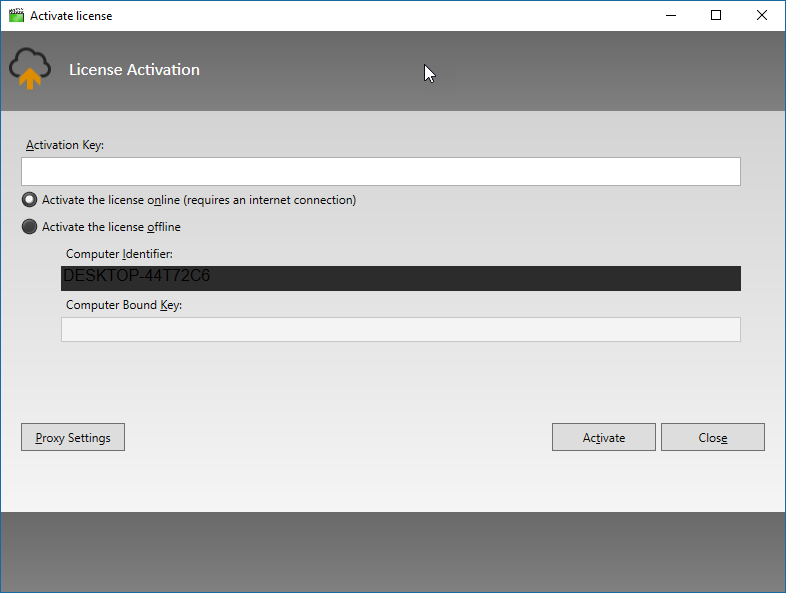
To use your license on another computer, see How to Move Your License to a New Computer.
Share this link with friends to make them happy:
https://videocataloger.com/
Troubleshooting
Solutions to the most common problems are on the Troubleshooting page. If that does not help you solve the issues you are experiencing with our software, please visit our online FAQ:
Fast Video Cataloger Requirements:
As a rule of thumb, any computer you usually do video processing on will be more than satisfactory, but to set the bar, we recommend at least the following list.
- Windows 10 or Windows 11
- 1024x768 display or larger
- i3, i5, i7, or equivalent processor
Not required but still recommended:
SSD or nvme drive for storing the video catalog file makes a significant difference in speed when you have large catalogs.
More than one computer monitor helps you when working with multiple windows.
Software's installed
When working with videos, you always need reliable codecs. By default, this is handled by the software, and you should not need to do anything. If you prefer your own codecs, you can check the "use directshow codecs" checkbox in the indexing tab. This should only be needed for some rare video formats. Enabling random codecs installed on your computer can reduce the stability of the program as what happens in these codecs is out of our control.
You will find all the information you need about video codecs and Fast Video Cataloger on the link below:
https://videocataloger.com/video-codecs
This software uses the Microsoft .NET framework. The required runtime is included with the installer. Please find all information you need about .NET and Fast Video Cataloger on the link below: