How to Import Catalogs into Fast Video Cataloger
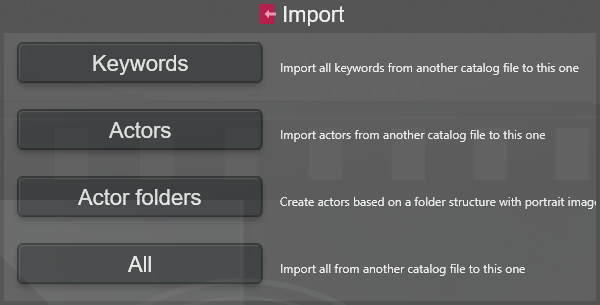
Fast Video Cataloger supports importing an entire catalog or only the keywords or the actors from a catalog. The import commands are on the Import page of the Start menu.
Import Keywords
The Keywords option imports all keywords from a selected catalog into the current catalog.
Import Actors
The Actors option will import all actors from another catalog into the currently active catalog. Once you have navigated, in the pop-up explorer window, to the catalog from which you wish to import actors, you will be presented with a list of actors to select from. If an actor has been imported before, it will be skipped. All actors can be imported regardless of whether they are used for a video or not.
The actors' learned faces come along, also the ones learned from videos, so face recognition finds the imported actors in this catalog's videos without learning their faces again. An actor that is skipped because it was imported before does not get the faces it has learned in the other catalog since then.
Import Actors folders
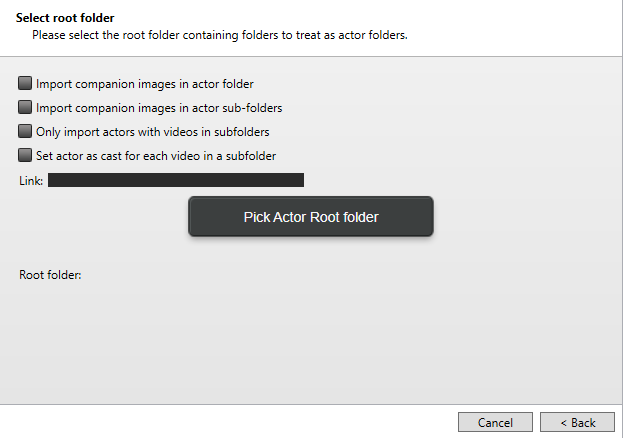
The Actor folders option allows you to import actors into your catalog based on a specific folder structure on your computer.
Starting at a root folder, every subfolder in this root folder should have Actor information.
Name of subfolder = Actor name
The first image in subfolder = Actor portrait
If a folder does not contain an image, it will be skipped. The wizard will help you get through the choices.
Keywords on the options page are added to every actor the wizard imports or updates. Separate several with commas; a keyword that is not in the catalog yet is created.
With Learn each actor's face from the pictures (on by default), each actor's face is learned from the folder's pictures, so face recognition finds the actor in your videos straight away. A picture with only the actor in it comes first and says who the actor is; after that, the face most like it is learned from pictures with several people, up to 10 faces per actor. Small faces are not learned. Pictures the actor has already learned from are skipped when you update an existing actor.
The list of actors to import also says when an actor's face looks like an actor already in your catalog, under another name, and shows that actor's portrait. You can then check Update to add the pictures and videos to that actor instead of importing a second one.
After the import, the wizard looks for the actors in their own videos: in each actor's folder, the unnamed person from the Unnamed people tab who looks like the actor and is in the most of the videos. If it finds any, click Next to see them beside the actors, with how many of the videos each is in. Finish names the checked people as those actors, which adds the actors to every video the people are in and learns their faces from the videos too. This only finds people in videos that have been indexed with face recognition.
Import All
The All option allows you to import all videos from a selected catalog into the current one. Metadata linked to each video will also be imported, including companion images, keywords, and actors. If a video is already in the catalog, it will be skipped.
Videos whose file cannot be found, for example on a drive that is not connected, are imported too. The import normally compares file contents to recognise a video that is already in the catalog under another path; for a file it cannot read it only compares the path. When importing to a server, a video whose file cannot be found is not imported, because its file has to be uploaded.
Along with the videos come their date added, genre, colour label, scenes, transcripts and subtitles, extended properties, face detections, the visual search index, the text read on screen, and the catalog's bins, playlists, keyword groups, archives, actors with their learned faces, and trained tags.
Importing into a catalog that already has some of this merges instead of adding it twice: a bin with the same name in the same place, a playlist with the same name, an archive with the same title and device, a keyword, a keyword group or a trained tag with the same name are used as they are, and get only what they do not have yet. Importing the same catalog twice adds nothing the second time.
User accounts and API keys are not imported: a shared catalog keeps its own.
A few face decisions from the Unnamed people tab stay in the catalog they were made in: Not this actor answers, so a suggestion you turned down can be shown again; faces you deleted, which indexing a video again in this catalog can find again; and what a naming added, so Unname cannot take back a naming made in the other catalog. The people you named, ignored or merged come along as they are.