Auto Tag Tab
In the Auto Tag tab (auto keywording) you set how the program assigns keywords to a video from the path to the video file when the video is indexed. The folder names and the file name are split into words at spaces, hyphens, underscores and punctuation, and each word, as well as each whole folder name, is a possible keyword. The file name as a whole is never used as a keyword.
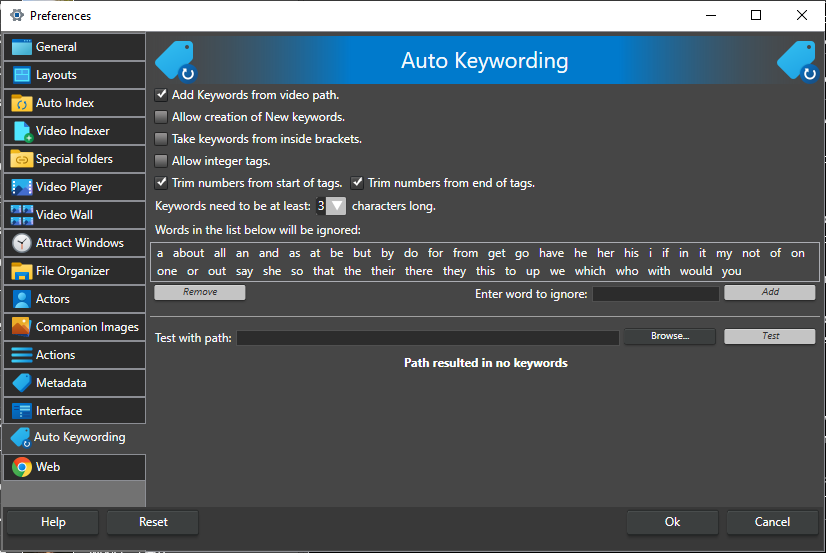
Add Keywords from video path. -- Turns automatic keywords from the path on or off. This is the same setting as Video Path under Extract metadata from on the Video Indexer tab. All the options below are hidden until this is checked. On by default.
Allow creation of New keywords. -- When checked, words from the path that are not keywords in the catalog yet are created as new keywords. When not checked, only keywords that already exist in the catalog are assigned (the match ignores upper and lower case). Off by default.
Take keywords from inside brackets. -- When checked, only text inside brackets is used, and the rest of the path is ignored. Square brackets, parentheses and curly braces are all recognized; for a path like c:\videos\test videos[home].mp4 only home is considered. Every bracketed group in the path is used, so [holiday] trip (home).mp4 gives holiday and home. Off by default.
Allow integer tags. -- When checked, a keyword can be a whole number such as 1, 42 or 2021, which is useful for years. Be careful: paths often contain numbers, so this can create a lot of keywords. When not checked, words that are only a number are ignored. Number trimming (below) leaves number-only words alone, so the trim options can stay on. Off by default.
Trim numbers from start of tags. -- When checked, digits at the start of a word are removed, so 2021Summer becomes Summer. On by default.
Trim numbers from end of tags. -- When checked, digits at the end of a word are removed, so Summer2021 becomes Summer. On by default.
Keywords need to be at least [n] characters long. -- Words shorter than this number of characters are ignored (0-7, default 3).
Words in the list below will be ignored: -- Words in this list are never used as keywords, whatever their upper or lower case. The list starts with a set of common words. To add a word, type it in Enter word to ignore: and click Add. To remove a word, select it in the list and click Remove.
Test with path: -- Type a path, or click Browse... to pick a file, and click Test. The keywords a video with that path would get are shown below the path, or a message that the path gives no keywords. The result is updated as you change the options above, so you can tune the settings before you index. When you add videos, the keywords for each video are also shown in a column in the Add Videos list.