Special Folders Tab
On the Special Folders tab you can set up to five special folders of your own and see the special folders the program creates automatically.
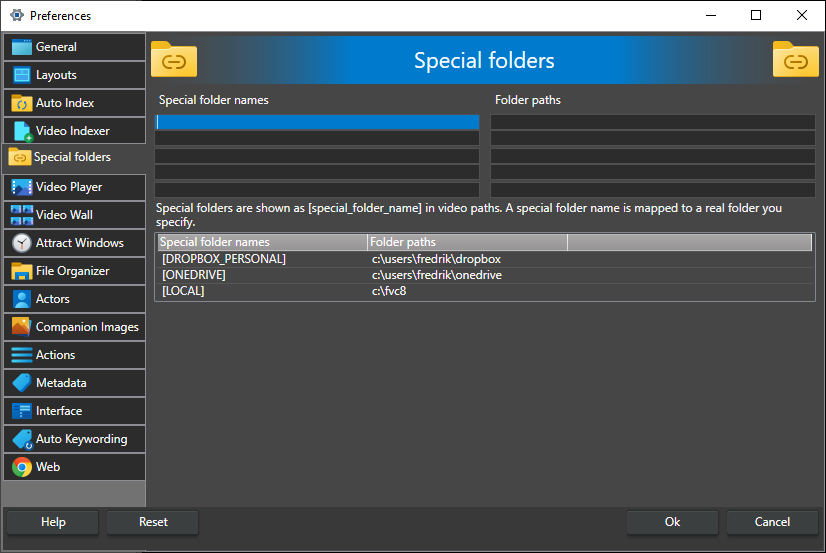
A special folder is a name that stands for a root folder. When you add a video from below that folder, the catalog stores the path with the name in square brackets instead of the real folder, and the name is turned back into the real path whenever the video is used. If you later move the videos, you only change the special folder's path, and every path in the catalog works again.
For example, all your videos are below d:\videos\presentations* and you create a special folder called presentations for that path. A video added from d:\videos\presentations\2024\talk.mp4 is stored as [presentations]\2024\talk.mp4. If you later move the videos to e:\archived_presentations*, change the path of the presentations special folder and the catalog finds them there.
Nothing in the catalog is changed when you create or edit a special folder. Special folders are used when videos are added, so set one up before you add the videos it should cover; videos already in the catalog keep the paths they were added with.
Special folder names -- The name of the special folder, without brackets. In the catalog it is shown as [name].
Folder paths -- The real folder the name stands for. A row is only used when it has both a name and a path, and the names the program uses itself (LOCAL, DROPBOX_PERSONAL, DROPBOX_BUSINESS, ONEDRIVE, WebServer) are ignored. Changes take effect as soon as you click Ok.
Special folders are stored with your preferences on this computer, not in the catalog. When a catalog is used on another computer, that computer needs a special folder with the same name, pointing to wherever the videos are on that computer.
Automatic special folders
The list at the bottom of the tab shows the special folders that are currently active. It is read-only. The program adds these automatically:
- [LOCAL] -- The folder the open catalog is stored in. Videos added from below the catalog's folder use it, so you can move the catalog together with its videos and the paths still work.
- [DROPBOX_PERSONAL] and [DROPBOX_BUSINESS] -- Your personal and business Dropbox folders, when Dropbox is installed. The paths are read from Dropbox's own settings, so the catalog keeps working if you move your Dropbox folder.
- [ONEDRIVE] -- Your OneDrive folder, when OneDrive is set up.
- [WebServer] -- Shown when the catalog's videos are served from a web server. It maps the local hosting folder to the web address the videos are played from; see Host Video from a Web Server.
The special folders you have entered yourself are also shown in the list once they are in use.