General Tab
The General tab sets the external programs Fast Video Cataloger hands files to, how the program starts, a few export options, and the interface language and theme.
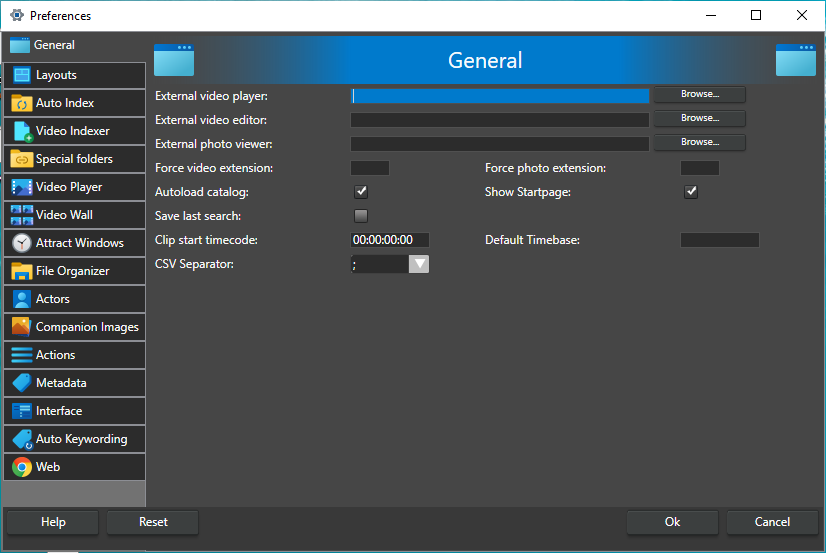
External video player -- The program used when you play a video in an external player. Leave it empty to use the program Windows opens the file type with. Click Browse to pick a program. This does not affect the internal video player, which is set up on the Video Player tab.
External video editor -- The program used when you open a video for editing. Leave it empty to use the Windows Edit action for the file type.
External photo viewer -- The program used to open photos, such as companion images. Leave it empty to use the program Windows opens the file type with.
Force video extension -- One file extension that is always treated as a video file, so files with it are indexed like avi or mp4 files. Enter the extension, for example mts; upper case and a leading dot are accepted.
Force photo extension -- One file extension that is always treated as a photo file, in the same way as jpg files. Upper case and a leading dot are accepted.
Autoload catalog -- Open the catalog you had open last time when the program starts. On by default.
Show Startpage -- Show the start page, with information on the latest version, when the program starts. On by default.
Save last search -- Save the current search when the catalog closes, so it is restored the next time. On by default.
Clip start timecode -- The start timecode given to new clips in a playlist, used when a playlist is exported as XML for a video editing program. The default is 00:00:00:00, and most users never need to change it.
Default Timebase -- The frame rate (frames per second) used when a playlist is exported as XML (for example for DaVinci Resolve) or EDL and a video has no frame rate stored in the catalog. Videos with a known frame rate always use their own. 1-120, default 30.
CSV Separator -- The character that separates values when you export or import CSV files: ; (semicolon, the default) or , (comma). Choose the one your spreadsheet program expects.
Language -- The language of the user interface: English, Swedish, German or Spanish. The change takes effect immediately. The documentation is only available in English.
Theme -- The color theme of the program: Dark (the default) or Light. The change takes effect immediately.