How to Automate Fast Video Cataloger with Scripts
In FVC 5, we added script support to Fast video cataloger. With scripts, you have full access to the backing video catalog and some access to the user interface. There is separate documentation for the scripting interface.
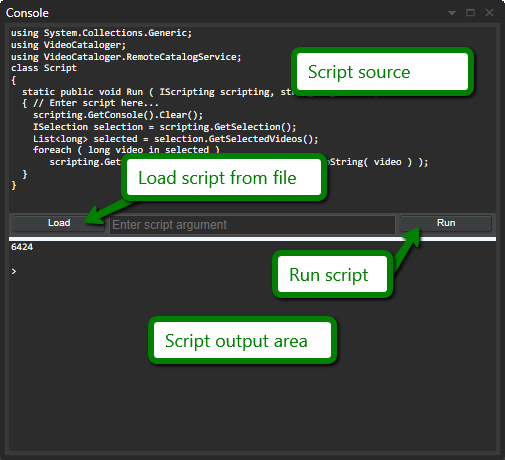
Scripts are entered in the upper part of the console window.
The Load button allows you to load a script from the file. We highly recommend writing scripts in an external dedicated text editor and load them into the program. In the script folder, there are many provided sample scripts. If you hold the shift button when you click the Load button, the file will be reloaded. This is useful when editing in an external editor like Visual studio.
The Run button runs the currently loaded script.
The lower section of the console window is where the script provides output. Output can either be error messages or text written from the script.
NOTE: Full documentation on scripting is available in the scripting documentation (Click the help button in the scripting window to open it). A number of sample scripts are included with the installation.