Layouts Tab
A layout is a saved arrangement of the program's windows. On this tab you name the layouts and choose when the program switches between them.
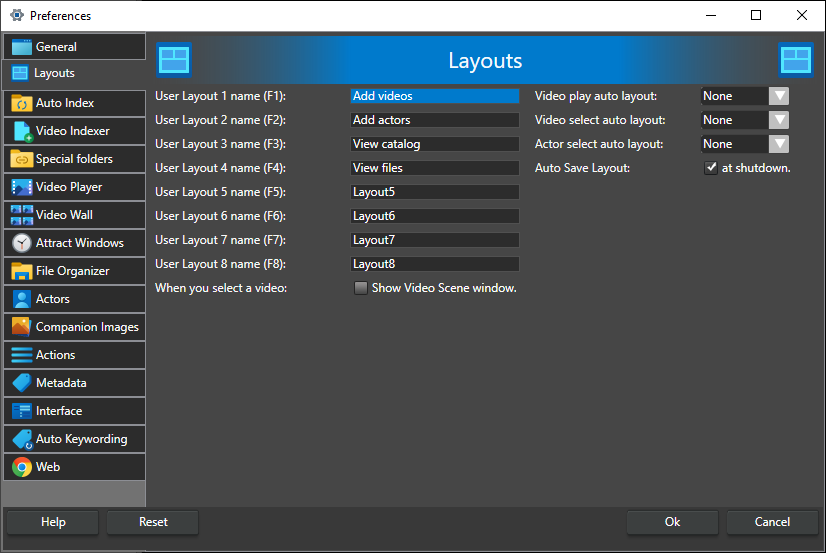
User Layout 1 name to User Layout 10 name -- The names shown for the ten layouts in the Layout menu. Use the name to say what each layout is for. The default keyboard shortcuts are F1 to F10, shown next to each label. The first four layouts start with different windows open, but you can arrange any layout as you like: select it, arrange the windows, and click Save in the Layout menu. See also Keyboard Shortcuts.
Video play auto layout -- Switch to this layout whenever a video starts playing. None (the default) leaves the layout as it is.
Video select auto layout -- Switch to this layout whenever you select a different video. None (the default) leaves the layout as it is.
Actor select auto layout -- Switch to this layout whenever you select a different actor. None (the default) leaves the layout as it is.
The three lists show the layouts by the names given above.
Auto Save Layout: at shutdown -- Save the window arrangement to the current layout when the program closes, so it looks the same the next time you start. On by default. Disabled while Lock layouts is checked.
When you select a video: Show Video Scene window -- Open the Video Scenes window, if it is hidden, when you select a video. Off by default.
Lock layouts -- Stop layouts from being saved. While it is checked, the Save and Reset buttons in the Layout menu and the other layout save controls are hidden, Auto Save Layout is greyed out, and the save layout shortcut shows a message that layouts are locked. Use it to keep a set of layouts from being changed by accident.