Face Recognition Tab
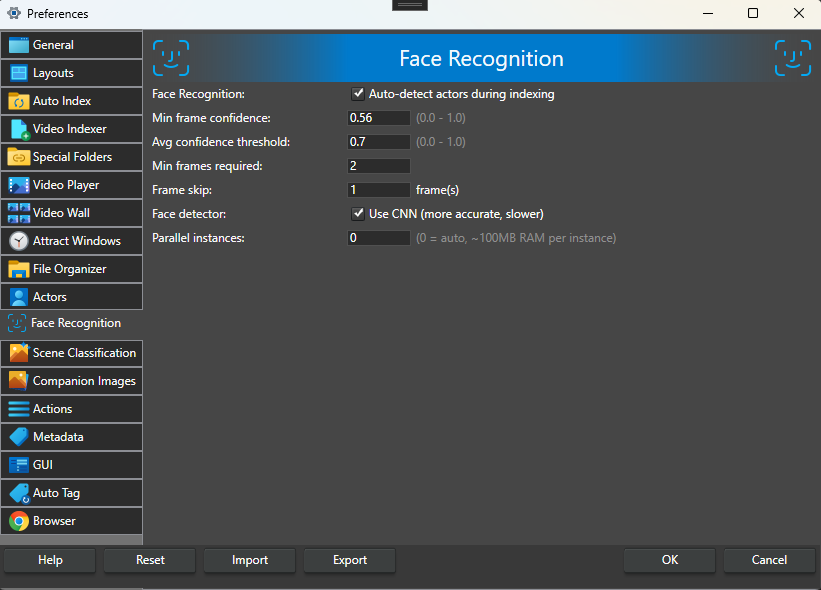
Face recognition allows Fast Video Cataloger to automatically detect faces in video thumbnails and match them to actors in your catalog. Before an actor can be recognized you need to learn their face: open the Edit Actor dialog, select one or more companion images that clearly show the actor's face, and click Learn Face. The quality and variety of these photos largely determine how well recognition works -- see Face Recognition for details and tips.
Face Recognition: Auto-detect actors during indexing -- When checked, faces are automatically detected and matched to actors during video indexing. Off by default.
Confidence threshold -- How closely a person in the video, averaged over their faces, must match an actor to be tagged. Higher values reduce false positives. Value between 0.0 and 1.0, default 0.64 (0.62 before version 10.5; a setting still at 0.62 is moved to 0.64 once). A person matched with both face models needs 0.02 less, see How It Works.
Min faces required -- A person must be seen in at least this many faces in the video before they can be tagged as an actor. Higher values reduce false positives. Value between 1 and 100, default 2.
Frame skip -- Process every Nth thumbnail. Set to 1 to process every thumbnail; 2 processes every second thumbnail, and so on. Higher values are faster but can miss actors who appear only briefly. Value between 1 and 100, default 1.
Face detector: Use CNN (more accurate, slower) -- The fast HOG (Histogram of Oriented Gradients) detector always runs. When this box is checked, the CNN (Convolutional Neural Network) detector also runs on every frame and the results of the two are combined. CNN finds faces at angles and in difficult lighting that HOG misses, but detection is about five times slower, and the extra faces do not make actor tagging more accurate. Off by default. See Detection Methods.
Detect Actors: Read faces from the video file when it is available -- When checked, Detect Actors reads each frame where it finds a face from the video file again, up to 1280 pixels wide, and recognizes the face from that instead of from the small thumbnail. This helps videos indexed before version 10.5; videos indexed with 10.5 or later already have it. Slower, since every frame with a face is read from the file. Offline and encrypted videos use the thumbnails. On by default. The Face Recognition batch tool has the same option.
Parallel instances -- Number of face recognition instances that run in parallel. Higher values use more memory but process faster. Each instance uses approximately 100 MB of RAM. Value between 0 and 64, default 0, which means auto: one instance per CPU core.