How to Make a Backup of a Catalog
Regular backups are an extra measure that you should take to avoid losing too much work if something goes wrong when working or with your computer.
You can Backup your video catalog (only the one you are working on). Click Catalog and choose Backup to bring up a dialog about the procedure. Backup starts once you click Yes. A progress window then shows the three steps, preparing, copying the catalog to the backup file and verifying the copy, with a bar for the copy and an estimated time left for the verify. The verify estimate is taken from the copy; on a slow disk it can run over, and the window then says so. Cancel stops the backup and removes the unfinished backup file; the window stays until that is done. Other catalog operations wait while the backup runs. The free space on the target drive is checked before anything is written; if the backup cannot fit, it stops with the space it needs and the previous backup is kept.
Note: If the catalog has damaged pages, the backup cannot rebuild it and makes a page-by-page copy instead, which carries the same damage and is not verified. The done dialog then says so, and until the catalog has been recovered or optimized, later backups of it copy page by page straight away instead of trying the rebuild first. Keep that backup, and run Recover catalog on the maintenance menu to rebuild the catalog into a new file, see How to recover a corrupt catalog.
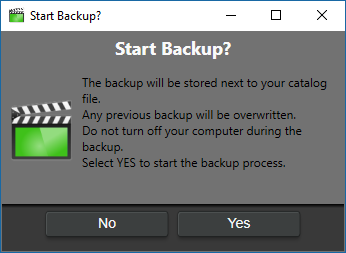
Your backup file gets saved in the same folder as your catalog file with the file extension .bak. We recommend moving it to another device once you have completed the backup process.
Note: The backup procedure will overwrite an existing previous backup. The 'No' option allows you to back out of backing-up if you decide to retain the earlier backup, either to be renamed and conserved or restore it in case of a suspected mess-up in your current cataloging work.