How to Create a New Catalog
Click Catalog/New... in the menu bar to create a catalog.
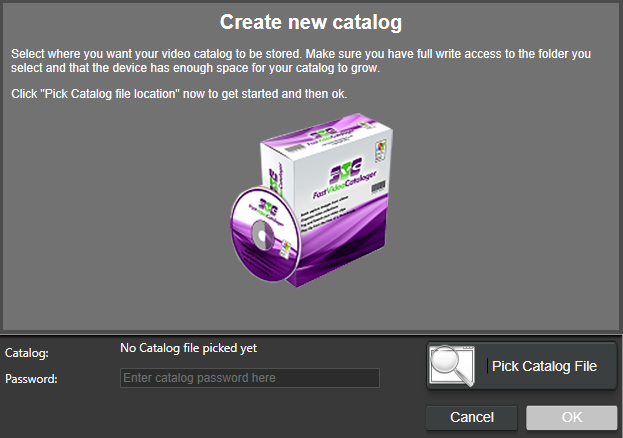
Press "Pick Catalog File" to choose a location on your storage media where you want the catalog database file to reside.
Create and name a New Folder if necessary, and ensure that that folder is open in the Save As file managing dialog box.
The default name for the database file is "videodatabase.vcat ". You can change the filename, BUT NOT the extension: .vcat .
Save the database file into your chosen folder (which may be, for example, at D:/FVC_catalogs/fvclog.vcat).
Note: We suggest creating a new folder to store all your catalogs in the same spot for easy access and future reference.
Tip (optional): Your video catalog does not have to be in the same location as your videos. Select a fast storage device for your video catalog and a slower/cheaper one for your videos.
Quick note: Moving the catalog file after it has been created and populated is possible. However, before moving the catalog file, ensure you do not have files in your indexing queue for that video catalog.
-
Close the program
-
Move the File
-
Start the program and select "open" to find the File
Moving the catalog file is helpful if you want to archive/backup the catalog file to an external device or share your catalogs with other users.
The video catalog includes all information about your videos but not the actual video files themselves.
If you choose to add a password for your video catalog, please remember it. If you lose your password, you lose the work you have done with your video catalog.
When you need extra high security, you may also use the password for encryption.
Special Note: If you now forget the password, your masked video files are lost (cannot be played), and there is no way to recover them. Make sure you have sufficient backups. Only change the password if you are sure of what you are doing.
If you are store videos in subfolders below the catalog file and add them to the catalog from there, the path in the catalog will be stored using a special folder. With a setup with the catalog in the root and all videos in folders below, it is possible to move the whole folder with catalog and videos and paths will still be valid.
Tip: Backup your video catalog from time to time.