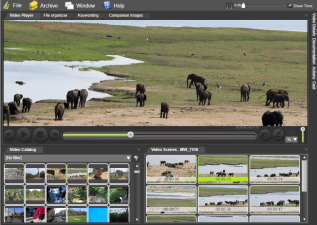
Working with video doesn’t have to be slow, painful or frustrating. Irrespective of which video manager solution you choose to work with, there are steps you can take to make the process quicker and easier. 1. Always use Fast Video Cataloger to find and move...
Here are 13 ideas for how to improve performance when working with videos – whether in Fast video cataloger or not. Fast video cataloger is usually a very fast program, but as with most programs, sometimes is not as quick as you would like! General performance...
We are constantly working to improve the fast video cataloger software. Among the most recent improvement are the Video wall Window and the ability to have a bunch of user layouts that you can quickly switch between. Here is a little insight into what we are currently...
How do you change Windows drive letters for external disks, USBs or other storage devices? It’s actually quite simple. Fast video cataloger uses absolute paths to videos that include the drive letter from where the video was added. If that drive letter changes...
“What is so great about Fast video cataloger”, was the question we asked a selection of Fast video cataloger users. Read the summary of the answers and learn what the most used and liked features are in the software ( 3.2x ) Fast Video indexing Users liked...
Yesterday we released version 3.20 of Fast video cataloger. When I release a new version with important enough changes, I always try to send an email to our customers to let them know about the update and that they can get it for free. This time, almost immediately, I...
The next new feature in Fast video cataloger will save you time when you are using a computer with one monitor like a laptop. You can download the program from http://videocataloger.com/download The user interface in Fast video cataloger is highly customizable. Almost...
Fast video cataloger has a new feature that will help you browse for videos faster than ever before. This is probably the fastest way possible to quickly browse and discover videos in large collections. Right now I am putting the finishing touches to a new (version...
Today I want to show you how to find those special video moments instantly using Fast Video Cataloger! But, first some background… By annotating your catalog with keyword tags, or as it is called in the Fast video cataloger program, keywording, you make the...
I’ll show you the three steps to find a video clip in a large video file collection, and the easiest way to organize your video files. Quickly and without pain! Fast video cataloger is the perfect tool for the job, it will help you find videos quicker than ever...