
Features
Fast Video Cataloger is a Windows desktop app for organizing and searching large video collections — whether that’s a personal archive, a stock footage library, or a team’s shared catalog. Everything runs on your own PC, including the AI tagging and speech-to-text: your footage is never uploaded to a cloud service or shared with any third-party AI provider. Find the right clip by keyword, by what’s spoken on screen, or by what’s visible in the frame — across local drives, network shares, and disconnected external disks.

New In Fast Video Cataloger 10
AI auto-tagging while you index
Face detection (actors found in videos), scene classification, and object detection. Detected scenes and objects become keywords automatically, so videos arrive in the catalog already tagged instead of needing manual keywording.
Saves the hours editors normally spend tagging by hand.
Smart thumbnail cleanup
Long interview takes, security-camera-style footage, and slow time-lapses can produce hundreds of nearly identical thumbnails on a single video. Fast Video Cataloger detects and removes consecutive look-alikes, and optionally drops thumbnails that contain no faces — leaving you with a clean visual timeline that you can actually scan. Run it as part of indexing, or as a batch tool against an existing catalog.
Cuts the visual noise so each video reads at a glance.
Built-in transcription
Speech-to-text now ships in the box (no plugin). Search videos by spoken words and click any sentence to play from that exact moment.
Replaces scrubbing through interviews or long-form footage to find a quote.
Share over the internet with accounts
Set up a hosted catalog and your whole team works against the same library, wherever they are. Remote editors stay in sync without shuttling drives around. Clients can review work through the web client without installing anything. Freelancers get accounts scoped to just the project they need. And because the full scripting API is exposed as REST endpoints, the catalog plugs into the rest of your post-production pipeline. Read more about the multi-user video catalog.
Replaces shuttling drives and emailing footage between editors.
Blackmagic RAW (.braw) support
BRAW files can now be indexed, played, and cataloged alongside the previously supported formats.
Skips the conversion step before cinema footage is searchable.
Core features

Find the right scenes fast
Search huge collections by keyword and metadata, by the text of what’s spoken in each video, or by AI-detected scenes and objects — on their own or combined. Filter to “interviews from last March that mention budget” and you’re looking at the right clip in seconds, not hours of scrubbing.

Extend with custom meta data
Add custom metadata to videos and customize your catalogs. Companies using Fast Video Cataloger often need to store some company-specific meta data with the video. You can add extra fields to your catalog and store custom meta data with your video. And you can search of that data or access it in custom solutions through the scripting interface. Metadata can also be imported from video metadata like XMP.

Customize with scripting
Fast video cataloger supports scripting in C#. Customize the program or use it as a base to build your own video solutions. Documentation and samples are included with the installation. An AI assistant such as Claude can also search and tag the catalog through the MCP server.

Play from video thumbnails
Fast video cataloger comes with an integrated video player that can start playing videos right from the time of a captured thumbnail or from a sentence in a transcript.

Tools
Printable, shareable contact sheet images give quick overviews of your videos for discussions, presentations, and notes. Search for duplicate videos. Clean up near-identical or faceless thumbnails in a single pass. The integrated video file organizer keeps your catalog in sync as files move. Recover damaged catalogs into a fresh copy without touching the original. Plus tools to organize photos and actor data.

Flexible video Keywording
Keywording on videos and scenes will support your workflow, empower your team, and make your work on videos faster.

Collaborate
Fast Video Cataloger has integrated server support. From the Server menu, a wizard walks you through sharing a catalog locally or over the internet so your whole team can work in the same catalog. The hosted server option serves the videos and companion images alongside the catalog, each teammate can get their own account with configurable access rights, and a built-in web client lets people browse, tag and upload videos from a browser — no install required for occasional contributors.

Work disconnected
With a Fast video cataloger database you can search your entire video catalog even when video files are disconnected. This allows you to search reels on secondary storage devices. Once you know where the video is archived simply connect the right device and go to work.

Your ideal workspace
The user interface in Fast video cataloger is very flexible. You can customize it to only show the screens with the functions you need. You can set up multiple configurations and quickly switch between them, and you can create your ideal set up across one or several computer screens. When working with videos, you can make the most out of the screen estate you have available.

World-Class Video Database
Everyday video professionals save time when they can quickly find tutorial videos, presentation recordings, stock videos, marketing videos, or even old vacation videos. With Fast video cataloger, you can build a local meta-database that lets you organize all your videos and photos with keyword tags. Thumbnails are indexed automatically to give you an instant overview of the entire video file. The program lets you organize the videos without touching the video files. They never leave the security of your computer system.
The basics
Filtered list of videos
Search videos and get a filtered list of videos with key properties. Each video is represented with a thumbnail you select.
Column view
Click the columns in the list to sort the list. Drag the columns to get larger or smaller thumbnail. Or you can switch to icon view to get a more visual overview. We even have a Video wall that shows each video in time lapse view.
Layouts for one or more screens
You can easily design your own layout across one or several computer screens. And, the program allows you to have different layouts and switch between them instantly. Different tasks require different tools, the layout system lets you customize the software for the task you need to do, regardless if it is : adding video, keywording, viewing videos or simply just browsing videos for inspiration.
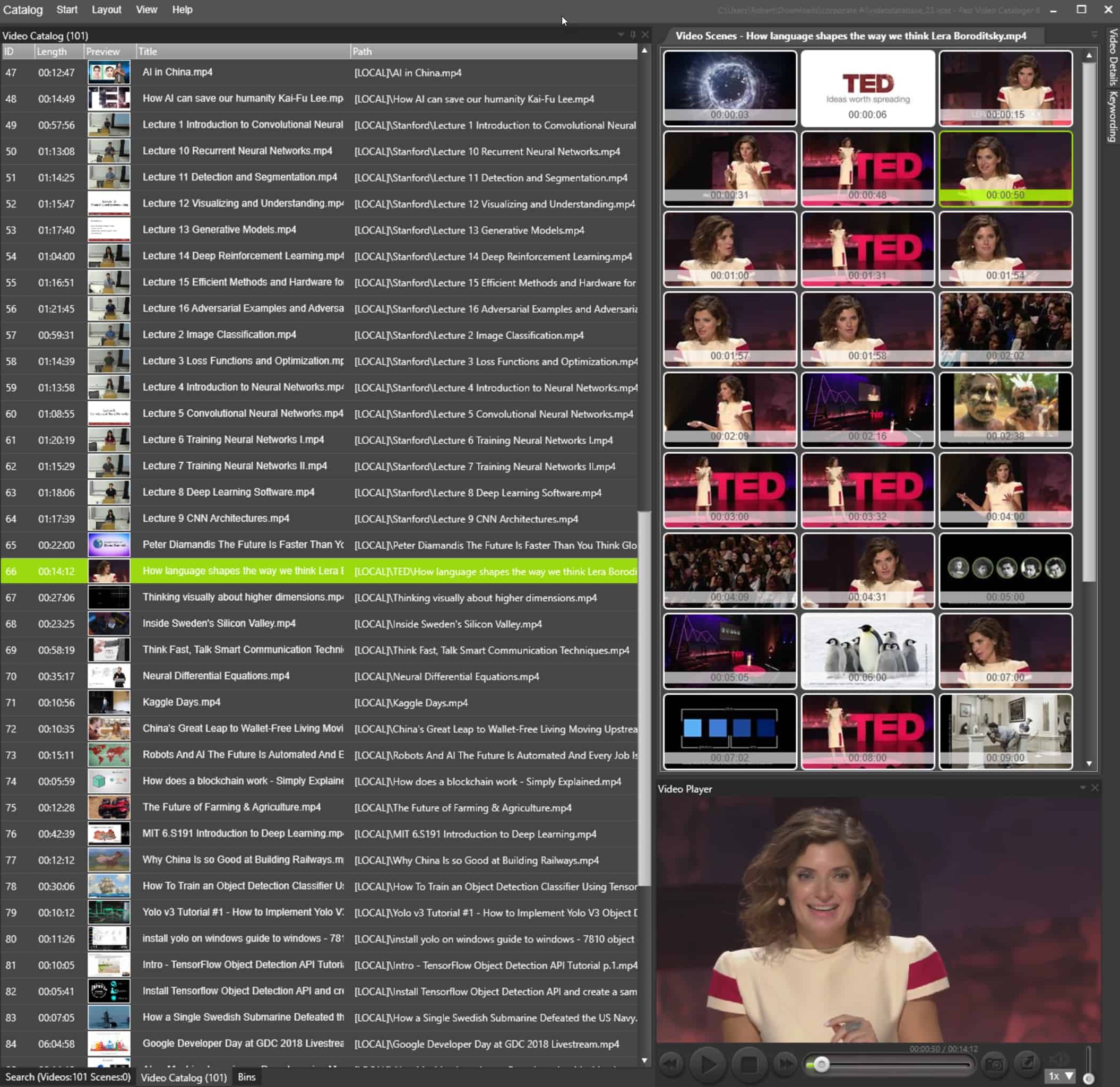
Video thumbnails
When you click the video in the list you get the whole video presented by thumbnails. Thumbnails are extracted automatically and you can add more where you want them.
Play from thumbnail
Click any thumbnail to jump to that time in the video and play from there.
Video player
The integrated video player support all common video formats. You can play video in fullscreen and from the Camera icon you can add a new thumbnail to the video overview.