
What is new in Fast Video Cataloger 10.6
Fast Video Cataloger 10.6 is now available for download. With this version you can find the words one person said in your interviews. You can also find the same video saved in another file, and play any video in the web client.
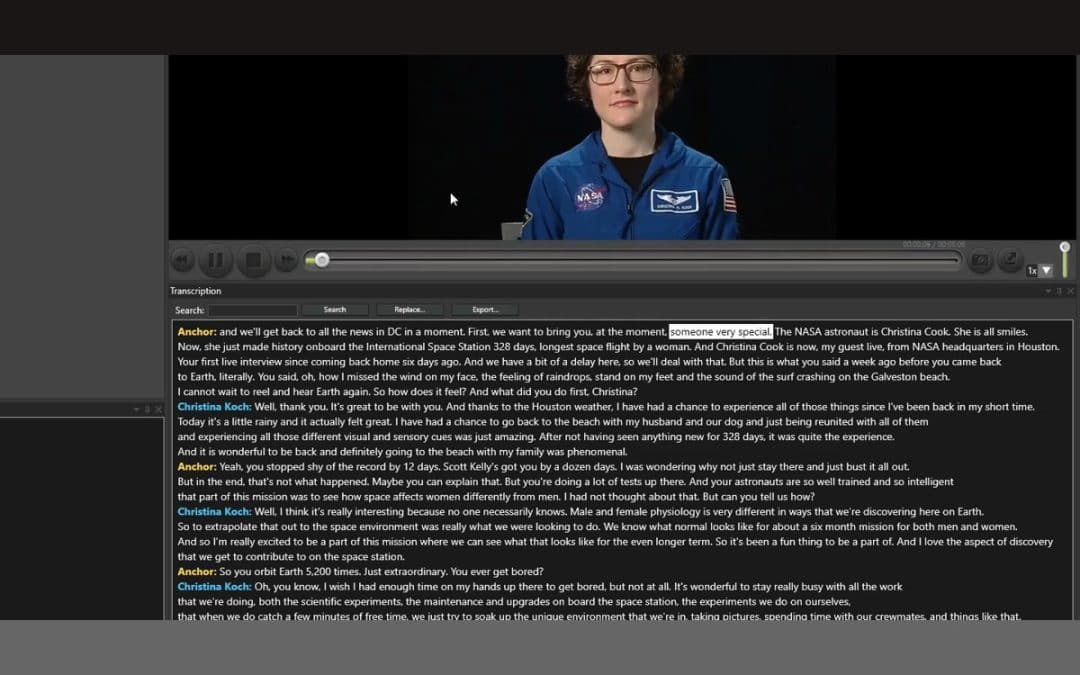
Transcripts now show who is speaking. When a video is transcribed, Fast Video Cataloger tells the voices apart. The transcript window shows the speaker before each turn. Right-click a line to name the speaker, or to move the line to another speaker. If a transcript has no speakers, for example because it was made before 10.6 or imported from an SRT file, Detect speakers finds them without transcribing the video again.
You do not have to name every speaker by hand. Name speakers suggests which actor each speaker is. It uses voices heard in other videos, and whose mouth moves while they speak. Then turn on Said by the actors in Cast in the Search window’s Transcript section. A search now finds only the words that actor said, not the interviewer’s question. Add to playlist on a transcript line adds a clip of exactly that line, so you can collect the answers for a cut. The transcription how-to shows the steps.
Check duplicate videos can now also find similar videos. That is the same video in another file, such as a re-encode, another resolution or another container. To check one clip, right-click it and choose File > Find copies of this video. Remove duplicate videos shows the size and resolution of each file and which one is kept. The duplicate videos how-to has the details.
The web client now plays videos a browser cannot play, such as WMV, AVI, MKV, DV and ProRes. The first time such a video is played, the server makes a smaller copy of it. Playback starts from the scene you clicked after a few seconds. You set how much disk space the copies may use in the Share Catalog wizard or Server Setup. The web client how-to explains how it works.
Some of the other things in 10.6:
- Save transcripts as SRT or WebVTT subtitle files, with your corrections.
- Replace in transcripts shows a few lines as they will read before you confirm, and Undo takes the last replace back.
- A new AI Tools page on the Start menu holds AI Models, Face Recognition, AI Scenes and Trained Tags.
- A new catalog offers to turn on transcription, image tagging and face recognition the first time you add videos.
- The web client searches spoken words, scenes described in words and people, and plays the video from the moment found.
- The catalog server can send webhooks when a video is added, indexed, given keywords or deleted, so tools such as Zapier or n8n can react.
Version 10.6 also has more than 50 smaller improvements and fixes. The full list is in the version history in the user guide.
Download the latest version from our download page. If you already run Fast Video Cataloger 10, the built-in update check will offer you the new version.