
What is new in Fast Video Cataloger 10.5
Fast Video Cataloger 10.5 is now available for download. With this version you can find every clip of a person without a photo of them first. You can also find a scene by the words that were shown on screen.
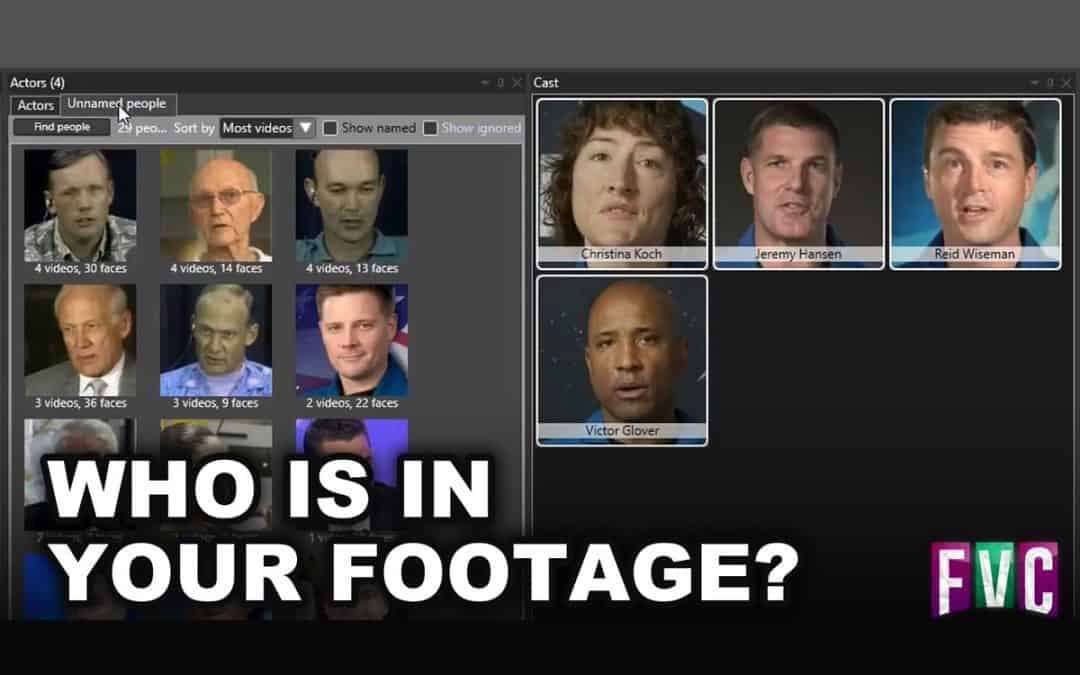
Face recognition now keeps every face it finds, also the faces of people who are not actors in your catalog yet. The new Unnamed people tab in the Actors window groups these faces into people. The people who appear in the most videos are at the top. Give a person a name, and the actor is added to every video that person is in. The face is also recognised in the videos you add later.
You can name several people as the same actor at once, merge two people, take out a wrong face or ignore the extras. When a person looks like an actor you already have, the actor’s portrait is shown next to the faces. One click tells Fast Video Cataloger if it is the same person. The Cast window also lists the unnamed people in the selected videos, so you can name them while you work. The face recognition how-to shows the steps.
Face recognition is also more accurate. It now compares all the faces of a person in a video instead of one face at a time. On 300 videos from a real catalog it added 48 correct actors and 2 wrong ones. Version 10.4 added 50 correct and 10 wrong. Faces are now read from the full-size video frame instead of the thumbnail, so small faces in wide shots are recognised too. Indexing is no slower. For videos you indexed before 10.5, run Detect Actors on them once to fill the Unnamed people tab.
The second new feature is Text on screen. Fast Video Cataloger reads the text that is shown in your videos, such as titles, name captions, slides and signs. Type a word in Text on screen contains in the Search window to find the scenes where it was shown. Turn it on in Preferences > Video Indexer. To read the videos already in your catalog, select them and choose Index > Read Text on Screen. It uses the text recognition built into Windows, so there is nothing to download. The text on screen how-to has the details.
Some of the smaller additions in 10.5:
- Correct a transcript in the Transcript window, or replace a word in every transcript at once. A corrected transcript is kept when the video is indexed again.
- Translate to English writes the transcripts of videos in other languages in English.
- Dates such as the recorded date get date pickers in the Search window, and you can search on a video’s colour label.
- The Keyword Manager can keep keywords that are no longer used, and hide them from the list.
- DV tapes captured to QuickTime or Matroska get the recording date on each thumbnail.
- The AI assistant connector can edit a video’s title, description and rating, and change its cast.
There are also many fixes and improvements. The full list is in the version history in the user guide.
Download the latest version from our download page. If you already run Fast Video Cataloger 10, the built-in update check will offer you the new version.