
Find any quote in hours of interviews. Nothing is uploaded.
Download the free 30-day trial
What it does
- Transcribes on your PC. The speech-to-text runs on your computer. Your files and your speakers’ words stay with you.
- Handles a whole archive. Point it at a folder and it transcribes every video. Each video is transcribed once. After that, a search takes a moment.
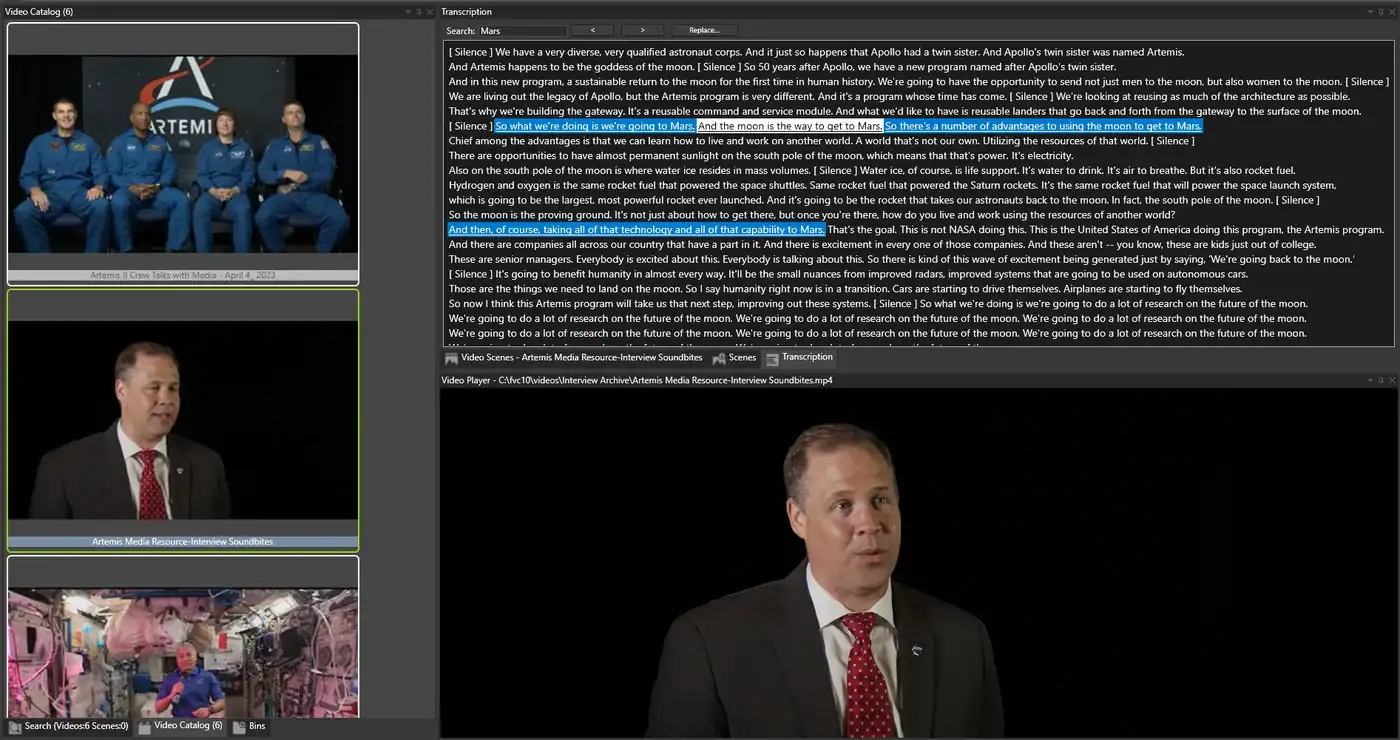
- Searches all your interviews at once. Type a word and see every interview where it is said.
- Jumps to the line. Click a line and the video plays from there. Step from one match to the next.
- Speaks your languages. About a hundred languages. It can also translate to English as it transcribes, so an interview in Spanish or German gets an English transcript you can search.
- Lets you fix the names. Speech-to-text gets names and jargon wrong. Correct a line, or replace a misspelled name in every transcript at once.
- Uses your best audio. If you recorded on a lavalier or an external recorder, transcribe that file instead of the camera sound.
- Reads your existing subtitles. An .srt file next to a video is read in as its transcript.
- Finds the people too. Face recognition finds a person across your videos. Combine it with a word to find where that person talks about it.
- Builds your selects. Add a transcript line to a playlist and play your picks back to back.
How to set it up, step by step: How to search video files by spoken words.
For researchers
Many ethics boards and consent forms do not allow interviews to be uploaded to a cloud service. Fast Video Cataloger transcribes on your computer, so the recordings are not uploaded anywhere. Step by step: how to transcribe research interviews without uploading them.
Search across every interview in your study, find each place a theme comes up, and play the answer in context.
One thing to know: if you connect an AI assistant such as Claude to your catalog, the transcript lines it reads are sent to that assistant. Leave it off for confidential material.
For documentary editors
Premiere Pro and DaVinci Resolve search the transcripts of the project you have open. Fast Video Cataloger searches every interview you have shot, across all your drives. Find the soundbite, add it to a playlist, and build a selects reel before you open your editor.
For oral history and archives
An archive grows for years. Fast Video Cataloger keeps every recording, its transcript, the people in it and your keywords in one catalog. Share the catalog with your team through the built-in server.
Good to know
- The program comes with an English speech-to-text model. For other languages, open AI Models from the File menu and download Speech-to-text Small – all languages (about 490 MB). It covers about a hundred languages and is also more accurate on English, but slower. It can also translate as it transcribes: tick Translate to English and interviews in any language get an English transcript you can search.
- Clear speech close to the microphone works best. Music, wind and people talking over each other make transcripts worse.
- Fast Video Cataloger is for Windows 10 and 11.
- It works with video files. It catalogs your interviews; it is not a transcript formatting tool.
Try it on your own interviews
Transcribe a folder of your own interviews and search for something you remember someone saying. Download the free 30-day trial.