
Managing a growing video library without proper cataloging software means lost footage, wasted hours, and missed deadlines. Whether you’re a video editor with thousands of clips, a training department managing course recordings, or someone organizing a personal video collection, the right cataloging tool makes the difference between searching for minutes and finding clips in seconds.
What to look for in video cataloging software
Before comparing options, here’s what matters most:
- Visual browsing — Can you see what’s in a video without opening it? Thumbnail timelines let you scan hours of footage at a glance.
- Search capabilities — Can you search by keyword, metadata, spoken words, or scene content?
- Local vs. cloud — Do you need to upload your videos to a server, or can you work locally with full privacy?
- Format support — Does it handle the video formats you actually use?
- Price model — Subscription or one-time purchase? What’s the long-term cost?
- Speed — Can it handle 10,000+ videos without slowing down?

Fast Video Cataloger — purpose-built for video libraries
Fast Video Cataloger is a Windows desktop application designed specifically for organizing and searching video collections. It has been in active development for over 15 years.
How it works
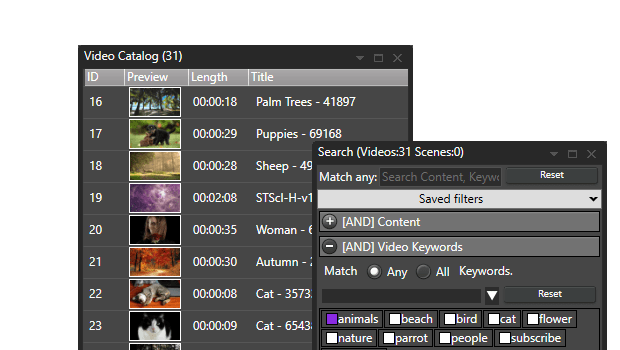
- Add your video folders — point it at local drives, external HDDs, USB sticks, or network shares
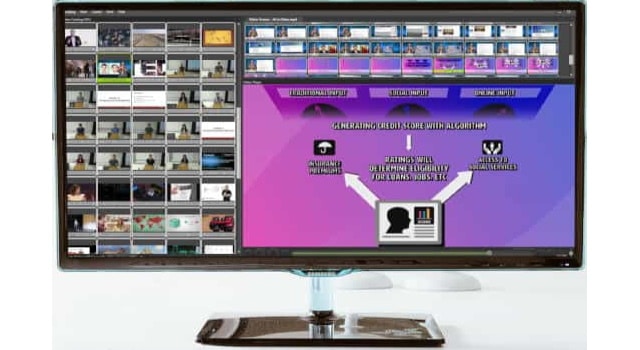
- Automatic indexing — the software extracts thumbnails automatically, creating a visual timeline for every video
- Search and browse — find any clip by keyword, metadata, scene tags, or spoken words (via AI transcription)
Key strengths
- Visual thumbnail timelines for every video — instantly see what’s in a clip without opening it
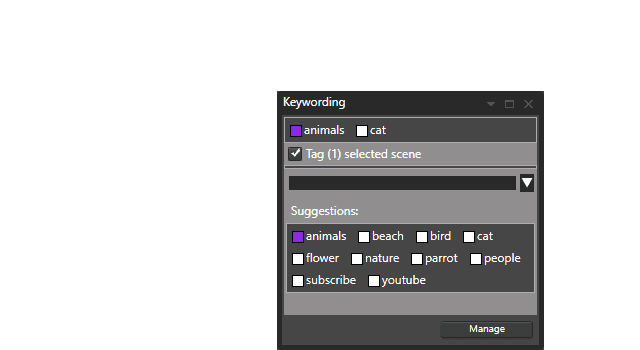
- Scene-level tagging — tag not just videos but specific moments within videos
- Works offline — browse and search your catalog even when video drives are disconnected
- Built-in speech-to-text — search videos by spoken words; transcription runs locally on your own machine
- XMP and metadata extraction — reads existing metadata, supports writing tags back to files
- C# scripting API — automate workflows, batch process, integrate with other tools
- Built-in server — share catalogs with a team on your local network or over the internet
- 100% local — no cloud uploads, no data leaves your machine
- Handles 10,000+ videos tested and fast
Pricing
- $9.90/month, $97/year, or $197 one-time perpetual license
- Free 30-day trial with full functionality, no email required
How Fast Video Cataloger compares
| Feature | Fast Video Cataloger | Cloud DAMs (Frame.io, Iconik) | General media organizers (Eagle, Adobe Bridge) | Manual folders |
|---|---|---|---|---|
| Visual thumbnail timelines | Automatic scene detection | Varies | Limited or none | None |
| Scene-level search | Keywords, metadata, transcripts | Varies by plan | File-level only | Folder names only |
| AI transcription search | Built-in, runs locally | Some (cloud-processed) | No | No |
| Works offline | Full catalog access | No — requires internet | Partial | Yes |
| Privacy | 100% local processing | Data on third-party servers | Local | Local |
| Video format support | All major formats via DirectShow | Upload-dependent | Limited | N/A |
| Price | From $9.90/mo or $197 one-time | $15-50+/mo recurring | $30-free | Free |
| Team sharing | Built-in server | Yes | No | Manual |
| Scripting/automation | C# API | API varies | Limited | None |
| Handles 10,000+ clips | Yes | Depends on plan/bandwidth | Varies | Impractical |
Who is it for?
- Video editors and producers managing footage across projects and drives
- Stock footage libraries cataloging thousands of clips with keyword tagging
- Corporate training departments finding specific segments in course recordings
- Personal collectors organizing home video libraries
- Small teams sharing a video catalog over a local network
Try it free
Download the fully functional 30-day trial — no email, no credit card, no cloud account required. Just install and start cataloging.